How to publish an iOS app on the App Store: the complete guide
Introduction
You have an idea for an iOS application and you want to get it into the hands of your first users? Publishing on the App Store can seem intimidating from the outside.
Here is the step-by-step process, as I have been applying it for the past 6 years on my own applications.
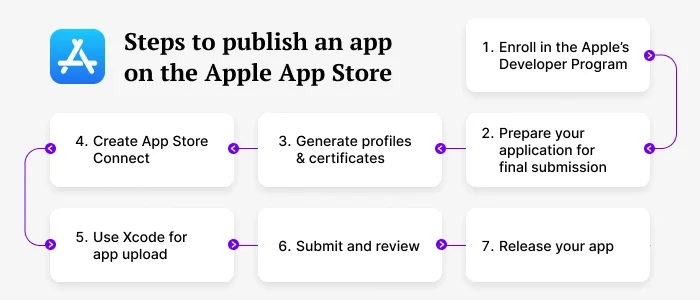
Step 1 - Create an Apple Developer Account
The first thing to do is to enroll in the Apple Developer Program. It costs $99 USD per year and gives access to the entire Apple distribution ecosystem: App Store, TestFlight, and signing certificates.
Go to developer.apple.com, sign in with your Apple ID, then join the Apple Developer Program. The verification process usually takes 24 to 48 hours.
💡 If you are developing for a company, you can also opt for the Apple Developer Enterprise Program, which allows internal distribution without going through the App Store.
Step 2 - Prepare Your App in Xcode
Before submitting, your app must meet several technical requirements:
- A unique Bundle Identifier (e.g.
com.yourname.yourapp) - A valid version number and build number
- App icons in all required sizes (use an icon generator to save time)
- The app must be signed with a valid distribution certificate
In Xcode, go to:
Product > Archive
to create a distribution archive. This is the file that will be sent to Apple.
Step 3 - Create the App Store Connect Listing
App Store Connect is the dashboard where you manage all your applications.
Create a new app and fill in the metadata:
- App name (30 characters max)
- Subtitle (30 characters — including keywords here has a direct impact on App Store SEO)
- Full description (4,000 characters)
- Keywords (100 characters on iOS — every character counts)
- Screenshots for each required screen size
💡 The description is not a direct ranking factor on the iOS App Store, but it strongly influences download decisions. Pay special attention to the first two sentences.
Step 4 - Submit for Apple Review
Once the archive is uploaded via Xcode or Transporter, select it in App Store Connect and submit it for review.
Apple reviews every application before publication.
The average review time is 24 to 48 hours for a first submission. Some apps are reviewed within hours, others may take a few days if a human reviewer is involved.
Most common rejection reasons:
- Non-compliant screenshots
- Misleading metadata
- App crashes on launch
- Missing features mentioned in the description
Step 5 - Publication
Once approved, you can choose to publish immediately or schedule a release date.
The app will be available on the global App Store within a few hours.
Publication is not the end - it’s the beginning. Early user ratings and reviews have a strong impact on your app’s organic visibility in the following weeks.
Conclusion
Publishing on the App Store requires preparation, but the process is well structured.
If you want to launch an iOS application but feel blocked by the technical side, I’m a freelance iOS developer and I can help you from concept to publication.